Diagrammes d'Architecture Essensys
Tous les diagrammes sont fournis en Mermaid (source). Ils sont rendus automatiquement sur GitHub et les viewers Markdown compatibles.
Note : Les references
img/*.pngci-dessous sont des ancres pour de futures exportations PNG. Les diagrammes Mermaid sont la source de verite.
1. Vue d'ensemble — Architecture Globale
Diagramme principal montrant tous les composants, flux et acteurs du systeme.
graph TB
    subgraph Utilisateurs
        user["👤 Utilisateur Final<br/>(Navigateur / Mobile)"]
        admin["🔧 Administrateur<br/>(SSH / Control Plane)"]
        wa_user["📱 WhatsApp"]
    end

    subgraph Externes["Systemes Externes"]
        ha["🏠 Home Assistant"]
        unifi["📷 UniFi Protect"]
        openai["🧠 OpenAI API"]
    end

    subgraph CICD["CI/CD"]
        github["GitHub Actions"]
        dockerhub["Docker Hub"]
    end

    subgraph RaspberryPi["Raspberry Pi 4/5 (ARM64)"]

        subgraph Ingress["Couche Ingress"]
            traefik["Traefik<br/>HTTPS WAN :443"]
            nginx["Nginx<br/>HTTP LAN :80"]
        end

        subgraph App["Couche Applicative"]
            frontend["Frontend React<br/>Dashboard SPA"]
            backend["Backend Go<br/>ACL :80"]
            mcp["MCP Server<br/>SSE :8083"]
            controlplane["Control Plane<br/>Go+React :9100"]
        end

        subgraph AI["Couche IA"]
            openclaw["OpenClaw<br/>:18789"]
        end

        subgraph Data["Couche Donnees"]
            redis[("Redis<br/>:6379")]
            mqtt["Mosquitto<br/>MQTT :1883"]
        end

        subgraph Monitoring["Couche Observabilite"]
            prometheus["Prometheus<br/>TSDB :9092"]
            alertmanager["Alertmanager<br/>:9093"]
            nodeexporter["Node Exporter"]
            cadvisor["cAdvisor<br/>:8082"]
        end

        subgraph DNS["DNS"]
            adguard["AdGuard Home<br/>:53 / :3000"]
        end
    end

    subgraph Terrain["Materiel sur Site"]
        subgraph BP["BP_MQX_ETH — Coldfire MCF52259"]
            bp_core["🔌 Carte Principale<br/>MQX RTOS / Port 80"]
        end

        subgraph BA["Boitiers Auxiliaires (I2C)"]
            ba_pdv["BA PDV<br/>Salon / Sejour<br/>8 lumieres + 6 volets"]
            ba_chb["BA CHB<br/>Chambres<br/>8 lumieres + 5 volets"]
            ba_pde["BA PDE<br/>Pieces d'eau<br/>8 lumieres + 3 volets<br/>+ 1 store"]
        end

        subgraph IHM["Interface Locale"]
            ecran["🖥️ Ecran Tactile<br/>UART 0"]
        end

        subgraph Capteurs["Capteurs"]
            linky["⚡ Compteur Linky<br/>UART 1200 bauds"]
            detect_alarme["🚨 Detecteurs Alarme<br/>Ouverture + Presence<br/>GPIO ETOR"]
            sonde_fuite["💧 Sondes Fuite Eau<br/>Lave-linge (AIN6)<br/>Lave-vaisselle (AIN5)"]
            anemo["🌬️ Anemometre<br/>Impulsions GPT"]
            detect_pluie["🌧️ Detecteur Pluie<br/>GPIO"]
        end

        subgraph Actionneurs["Actionneurs"]
            sirenes["🔔 Sirenes<br/>Interieure (PWM)<br/>Exterieure (GPIO)"]
            fil_pilote["🔥 Fil Pilote<br/>4 zones chauffage<br/>PWM"]
            cumulus_relay["♨️ Relais Cumulus<br/>GPIO DD5"]
            prise_secu["🔌 Prise Securite<br/>GPIO DD4"]
            prise_machine["🔌 Prise Machines<br/>Lave-linge/Vaisselle<br/>GPIO DD6"]
            vanne["🌿 Vanne Arrosage<br/>GPIO"]
        end

        subgraph Config["Configuration"]
            eeprom["💾 EEPROM SPI<br/>MAC + Cle + Code Alarme"]
        end
    end

    user -->|HTTPS| traefik
    user -->|HTTP LAN| nginx
    admin -->|HTTPS / SSH| traefik
    wa_user <-->|Messages| openclaw

    traefik --> frontend
    traefik --> controlplane
    nginx --> backend
    nginx --> controlplane
    nginx --> openclaw
    nginx --> prometheus

    frontend -.->|Assets statiques| nginx

    backend <-->|Table echange + Actions| redis
    backend <-->|Polling HTTP 2s<br/>JSON malformes| bp_core
    backend <-->|Publie etats / Recoit cmds| mqtt
    backend -->|/metrics| prometheus

    mcp <-->|Lecture/Ecriture| redis
    openclaw <-->|Outils MCP| mcp
    openclaw -->|Reformule alertes| openai
    alertmanager -->|Webhook /hooks/agent| openclaw

    mqtt <-->|Discovery + Commandes| ha

    controlplane <--> redis
    controlplane --> prometheus
    prometheus --> nodeexporter
    prometheus --> cadvisor
    prometheus --> alertmanager

    github -->|Push images ARM64/AMD64| dockerhub
    controlplane -.->|Pull images| dockerhub

    backend -->|Snapshots| unifi

    bp_core <-->|I2C 50 kHz| ba_pdv
    bp_core <-->|I2C 50 kHz| ba_chb
    bp_core <-->|I2C 50 kHz| ba_pde
    bp_core <-->|UART 0| ecran
    bp_core <---|UART 1| linky
    bp_core <---|GPIO ETOR| detect_alarme
    bp_core <---|ADC| sonde_fuite
    bp_core <---|Impulsions| anemo
    bp_core <---|GPIO| detect_pluie
    bp_core -->|PWM + GPIO| sirenes
    bp_core -->|PWM| fil_pilote
    bp_core -->|GPIO DD5| cumulus_relay
    bp_core -->|GPIO DD4| prise_secu
    bp_core -->|GPIO DD6| prise_machine
    bp_core -->|GPIO| vanne
    bp_core <-->|SPI| eeprom

    classDef legacy fill:#ff9999,stroke:#cc0000,color:#000
    classDef modern fill:#99ccff,stroke:#0066cc,color:#000
    classDef data fill:#99ff99,stroke:#009900,color:#000
    classDef monitoring fill:#ffcc99,stroke:#cc6600,color:#000
    classDef ai fill:#cc99ff,stroke:#6600cc,color:#000
    classDef ingress fill:#ffff99,stroke:#999900,color:#000
    classDef external fill:#e0e0e0,stroke:#666,color:#000
    classDef hw fill:#ffcccc,stroke:#990000,color:#000
    classDef sensor fill:#ccffcc,stroke:#006600,color:#000
    classDef actuator fill:#ccccff,stroke:#000099,color:#000

    class bp_core legacy
    class frontend,backend,mcp,controlplane modern
    class redis,mqtt data
    class prometheus,alertmanager,nodeexporter,cadvisor monitoring
    class openclaw ai
    class openai ai
    class traefik,nginx ingress
    class ha,unifi,github,dockerhub external
    class ba_pdv,ba_chb,ba_pde hw
    class ecran,eeprom hw
    class linky,detect_alarme,sonde_fuite,anemo,detect_pluie sensor
    class sirenes,fil_pilote,cumulus_relay,prise_secu,prise_machine,vanne actuator
2. Flux de Donnees — Du Bouton au Relais
Sequence complete depuis le clic utilisateur jusqu'a l'activation physique du relais.
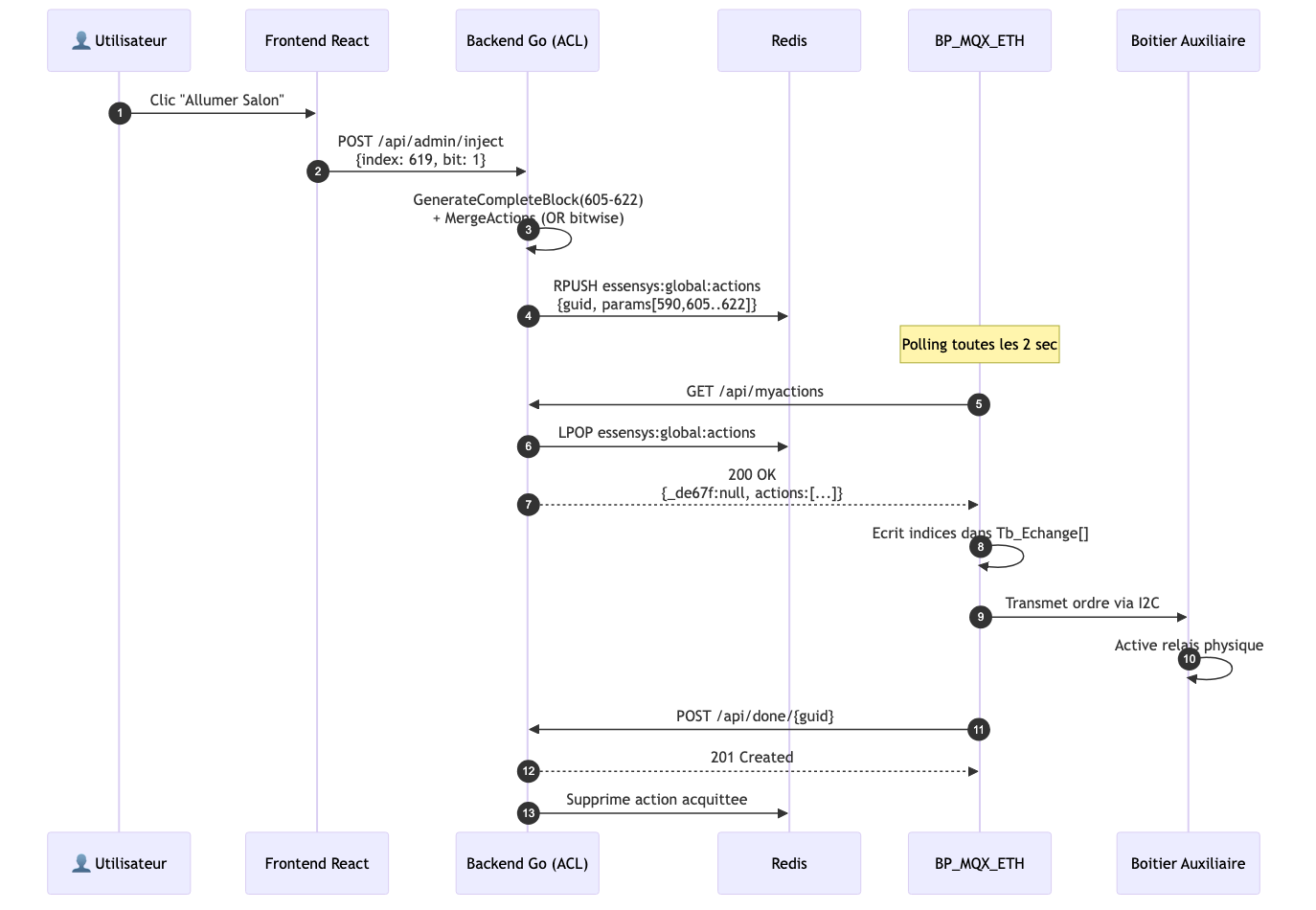
sequenceDiagram
    autonumber
    participant U as 👤 Utilisateur
    participant FE as Frontend React
    participant BE as Backend Go (ACL)
    participant R as Redis
    participant FW as BP_MQX_ETH
    participant BA as Boitier Auxiliaire

    U->>FE: Clic "Allumer Salon"
    FE->>BE: POST /api/admin/inject<br/>{index: 619, bit: 1}
    BE->>BE: GenerateCompleteBlock(605-622)<br/>+ MergeActions (OR bitwise)
    BE->>R: RPUSH essensys:global:actions<br/>{guid, params[590,605..622]}

    Note over FW: Polling toutes les 2 sec

    FW->>BE: GET /api/myactions
    BE->>R: LPOP essensys:global:actions
    BE-->>FW: 200 OK<br/>{_de67f:null, actions:[...]}

    FW->>FW: Ecrit indices dans Tb_Echange[]
    FW->>BA: Transmet ordre via I2C
    BA->>BA: Active relais physique

    FW->>BE: POST /api/done/{guid}
    BE-->>FW: 201 Created
    BE->>R: Supprime action acquittee
3. Flux d'Alertes — De la Metrique au WhatsApp
Chaine complete de surveillance : du capteur a la notification WhatsApp.
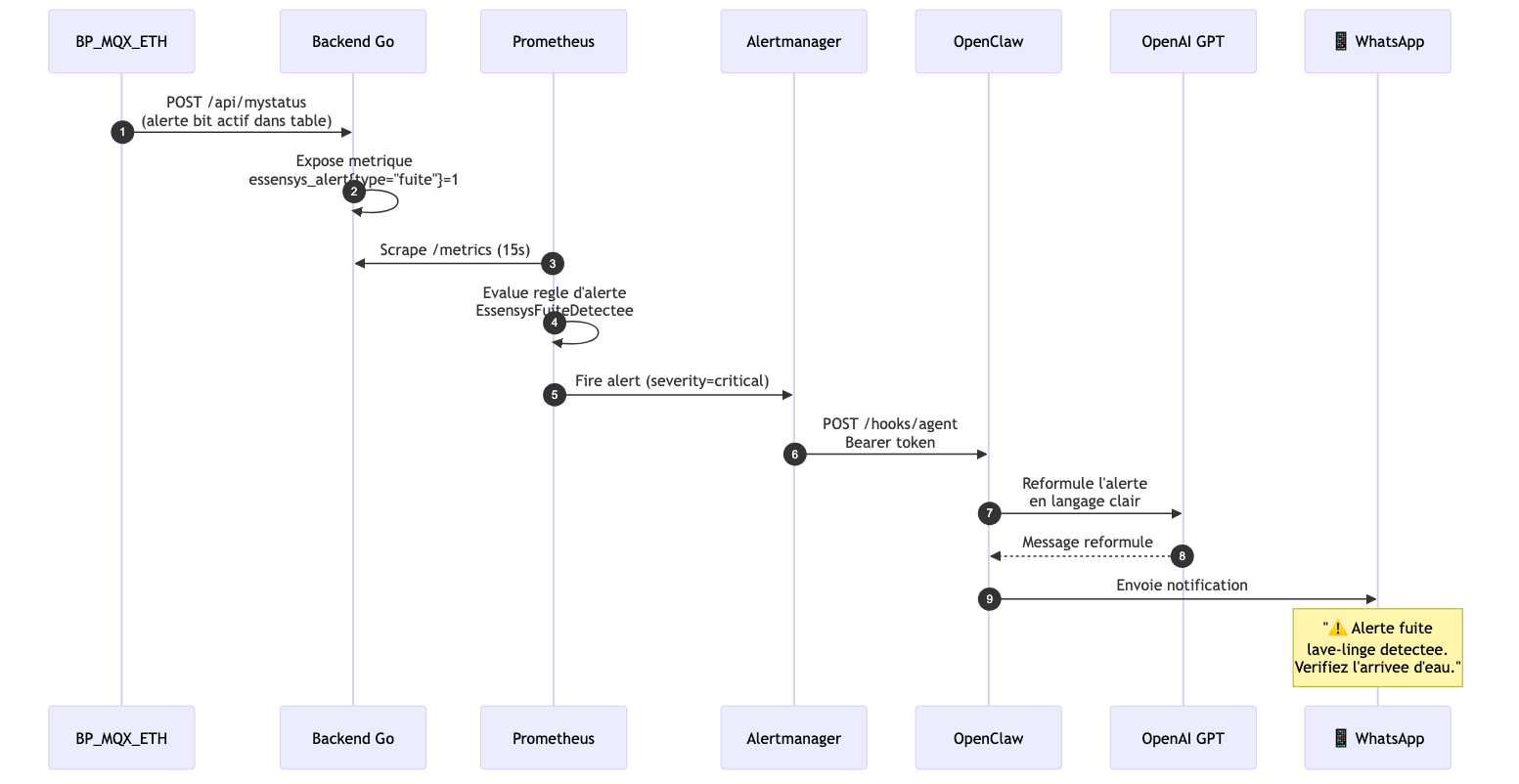
sequenceDiagram
    autonumber
    participant FW as BP_MQX_ETH
    participant BE as Backend Go
    participant P as Prometheus
    participant AM as Alertmanager
    participant OC as OpenClaw
    participant AI as OpenAI GPT
    participant WA as 📱 WhatsApp

    FW->>BE: POST /api/mystatus<br/>(alerte bit actif dans table)
    BE->>BE: Expose metrique<br/>essensys_alert{type="fuite"}=1
    P->>BE: Scrape /metrics (15s)
    P->>P: Evalue regle d'alerte<br/>EssensysFuiteDetectee
    P->>AM: Fire alert (severity=critical)
    AM->>OC: POST /hooks/agent<br/>Bearer token
    OC->>AI: Reformule l'alerte<br/>en langage clair
    AI-->>OC: Message reformule
    OC->>WA: Envoie notification
    Note over WA: "⚠️ Alerte fuite<br/>lave-linge detectee.<br/>Verifiez l'arrivee d'eau."
4. Architecture des Conteneurs — Diagramme C4 Container
Vue C4 de niveau 2 montrant les 14 conteneurs et leurs interactions.
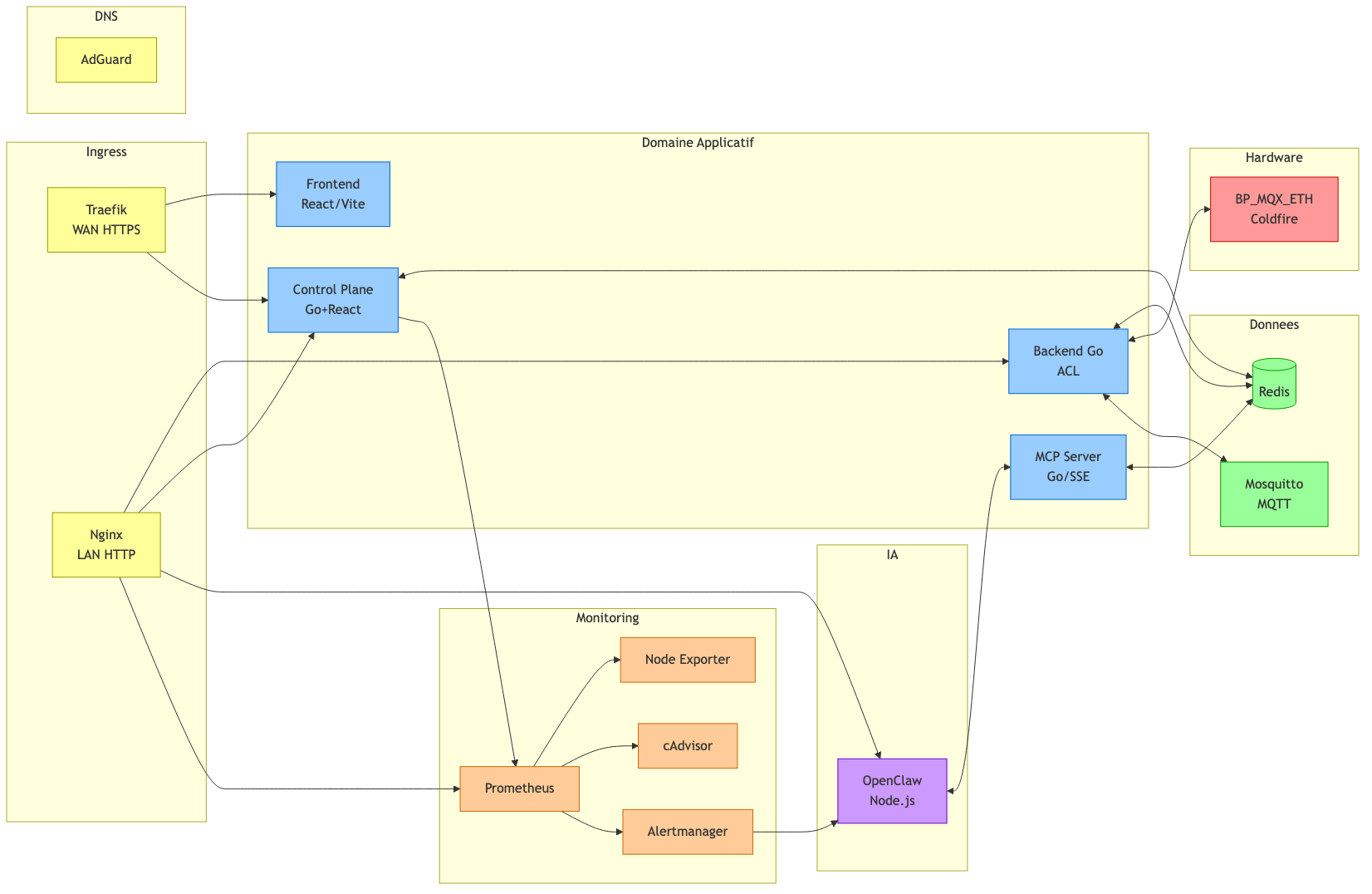
graph LR
    subgraph Edge["Ingress"]
        traefik["Traefik<br/>WAN HTTPS"]
        nginx["Nginx<br/>LAN HTTP"]
    end

    subgraph Application["Domaine Applicatif"]
        frontend["Frontend<br/>React/Vite"]
        backend["Backend Go<br/>ACL"]
        mcp["MCP Server<br/>Go/SSE"]
        cp["Control Plane<br/>Go+React"]
    end

    subgraph Intelligence["IA"]
        oc["OpenClaw<br/>Node.js"]
    end

    subgraph Donnees["Donnees"]
        redis[("Redis")]
        mqtt["Mosquitto<br/>MQTT"]
    end

    subgraph Observabilite["Monitoring"]
        prom["Prometheus"]
        am["Alertmanager"]
        ne["Node Exporter"]
        ca["cAdvisor"]
    end

    subgraph DNS_Zone["DNS"]
        ag["AdGuard"]
    end

    subgraph Legacy["Hardware"]
        hw["BP_MQX_ETH<br/>Coldfire"]
    end

    traefik --> frontend
    traefik --> cp
    nginx --> backend
    nginx --> cp
    nginx --> oc
    nginx --> prom

    backend <--> redis
    backend <--> hw
    backend <--> mqtt
    mcp <--> redis
    oc <--> mcp
    am --> oc
    cp <--> redis
    cp --> prom
    prom --> ne
    prom --> ca
    prom --> am

    classDef legacy fill:#ff9999,stroke:#cc0000
    classDef app fill:#99ccff,stroke:#0066cc
    classDef data fill:#99ff99,stroke:#009900
    classDef mon fill:#ffcc99,stroke:#cc6600
    classDef ai fill:#cc99ff,stroke:#6600cc
    classDef edge fill:#ffff99,stroke:#999900

    class hw legacy
    class frontend,backend,mcp,cp app
    class redis,mqtt data
    class prom,am,ne,ca mon
    class oc ai
    class traefik,nginx edge
    class ag edge
5. Anti-Corruption Layer — Pattern Bridge
Comment le backend Go traduit entre le monde legacy et le monde moderne.
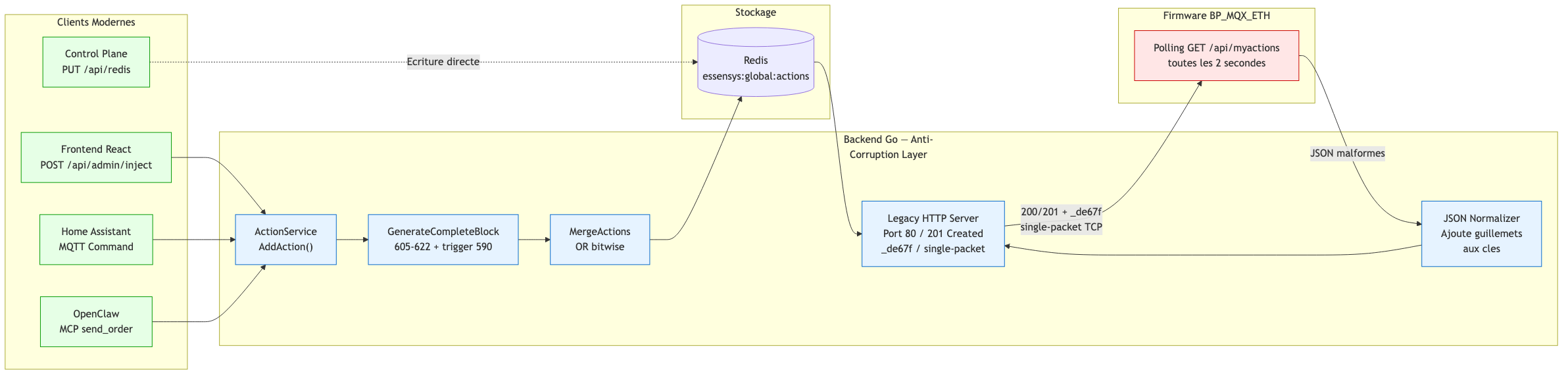
graph LR
    subgraph Moderne["Clients Modernes"]
        fe["Frontend React<br/>POST /api/admin/inject"]
        ha["Home Assistant<br/>MQTT Command"]
        ai["OpenClaw<br/>MCP send_order"]
        cp["Control Plane<br/>PUT /api/redis"]
    end

    subgraph ACL["Backend Go — Anti-Corruption Layer"]
        norm["JSON Normalizer<br/>Ajoute guillemets<br/>aux cles"]
        as["ActionService<br/>AddAction()"]
        block["GenerateCompleteBlock<br/>605-622 + trigger 590"]
        merge["MergeActions<br/>OR bitwise"]
        legacy_srv["Legacy HTTP Server<br/>Port 80 / 201 Created<br/>_de67f / single-packet"]
    end

    subgraph Storage["Stockage"]
        redis[("Redis<br/>essensys:global:actions")]
    end

    subgraph Legacy["Firmware BP_MQX_ETH"]
        fw["Polling GET /api/myactions<br/>toutes les 2 secondes"]
    end

    fe --> as
    ha --> as
    ai --> as
    cp -.->|Ecriture directe| redis

    as --> block
    block --> merge
    merge --> redis

    fw -->|JSON malformes| norm
    norm --> legacy_srv
    redis --> legacy_srv
    legacy_srv -->|200/201 + _de67f<br/>single-packet TCP| fw

    classDef acl fill:#e6f3ff,stroke:#0066cc
    classDef legacy fill:#ffe6e6,stroke:#cc0000
    classDef modern fill:#e6ffe6,stroke:#009900

    class norm,as,block,merge,legacy_srv acl
    class fw legacy
    class fe,ha,ai,cp modern
6. Table d'Echange — Structure Memoire
Organisation de la table d'echange en memoire (953 octets).
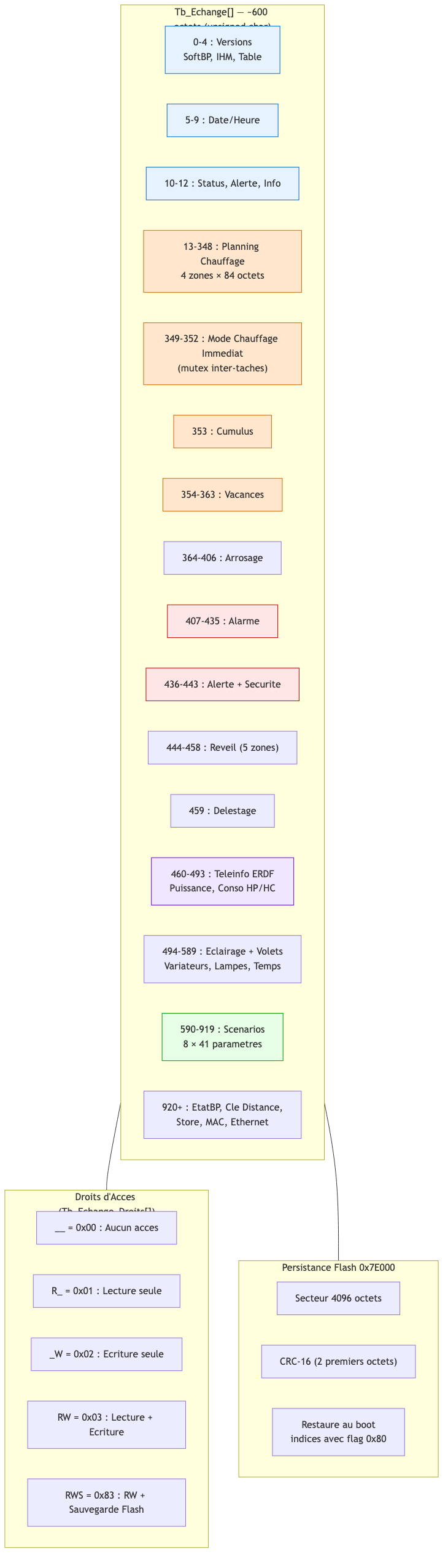
graph TB
    subgraph Table["Tb_Echange[] — 953 octets (unsigned char)"]
        v["0-4 : Versions<br/>SoftBP, IHM, Table"]
        dt["5-9 : Date/Heure"]
        st["10-12 : Status, Alerte, Info"]
        ch["13-348 : Planning Chauffage<br/>4 zones × 84 octets"]
        cm["349-352 : Mode Chauffage Immediat<br/>(mutex inter-taches)"]
        cu["353 : Cumulus"]
        va["354-363 : Vacances"]
        ar["364-406 : Arrosage"]
        al["407-435 : Alarme"]
        se["436-443 : Alerte + Securite"]
        re["444-458 : Reveil (5 zones)"]
        de["459 : Delestage"]
        ti["460-493 : Teleinfo ERDF<br/>Puissance, Conso HP/HC"]
        ec["494-589 : Eclairage + Volets<br/>Variateurs, Lampes, Temps"]
        sc["590-919 : Scenarios<br/>8 × 41 parametres"]
        bp["920+ : EtatBP, Cle Distance,<br/>Store, MAC, Ethernet"]
    end

    subgraph Droits["Droits d'Acces (Tb_Echange_Droits[])"]
        d1["__ = 0x00 : Aucun acces"]
        d2["R_ = 0x01 : Lecture seule"]
        d3["_W = 0x02 : Ecriture seule"]
        d4["RW = 0x03 : Lecture + Ecriture"]
        d5["RWS = 0x83 : RW + Sauvegarde Flash"]
    end

    subgraph Flash["Persistance Flash 0x7E000"]
        f1["Secteur 4096 octets"]
        f2["CRC-16 (2 premiers octets)"]
        f3["Restaure au boot<br/>indices avec flag 0x80"]
    end

    Table --- Droits
    Table --- Flash

    classDef version fill:#e6f3ff,stroke:#0066cc
    classDef heating fill:#ffe6cc,stroke:#cc6600
    classDef alarm fill:#ffe6e6,stroke:#cc0000
    classDef scenario fill:#e6ffe6,stroke:#009900
    classDef teleinfo fill:#f0e6ff,stroke:#6600cc

    class v,dt,st version
    class ch,cm,cu,va heating
    class al,se alarm
    class sc scenario
    class ti teleinfo
7. Deploiement — Infrastructure
Vue physique du deploiement sur Raspberry Pi.

graph TB
    subgraph Internet["Internet / WAN"]
        user["👤 Utilisateurs distants"]
        dev["🔧 Developpeurs"]
    end

    subgraph Cloud["Services Cloud"]
        gh["GitHub<br/>Code Source"]
        gha["GitHub Actions<br/>CI/CD ARM64/AMD64"]
        dh["Docker Hub<br/>essensyshub/*"]
        oai["OpenAI API"]
    end

    subgraph LAN["Reseau Local 192.168.x.x"]
        subgraph RPi["Raspberry Pi 4/5"]
            subgraph Docker["Docker Compose — 14 conteneurs"]
                c1["Backend :80"]
                c2["MCP :8083"]
                c3["Frontend"]
                c4["Nginx :80"]
                c5["Traefik :443"]
                c6["Control Plane :9100"]
                c7["Redis :6379"]
                c8["Mosquitto :1883"]
                c9["Prometheus :9092"]
                c10["Alertmanager :9093"]
                c11["Node Exporter"]
                c12["cAdvisor :8082"]
                c13["AdGuard :53"]
                c14["OpenClaw :18789"]
            end
            ansible["Ansible<br/>Provisioning"]
        end

        bp1["BP_MQX_ETH #1<br/>192.168.0.151"]
        bp2["BP_MQX_ETH #2<br/>(optionnel)"]
        cameras["UniFi Protect<br/>Cameras IP"]
        hass["Home Assistant"]
    end

    user -->|HTTPS| c5
    dev -->|Git Push| gh
    gh --> gha
    gha -->|Docker Push| dh
    c6 -.->|Docker Pull| dh
    c14 -->|API| oai

    c1 <-->|HTTP :80 Polling| bp1
    c1 <-->|HTTP :80 Polling| bp2
    c8 <-->|MQTT| hass
    c1 -->|HTTPS| cameras

    classDef rpi fill:#e6f3ff,stroke:#0066cc
    classDef cloud fill:#f0f0f0,stroke:#999
    classDef hw fill:#ffe6e6,stroke:#cc0000

    class c1,c2,c3,c4,c5,c6,c7,c8,c9,c10,c11,c12,c13,c14 rpi
    class gh,gha,dh,oai cloud
    class bp1,bp2 hw
8. Les 4 Points d'Entree des Ordres
Comment les commandes arrivent au firmware depuis differentes sources.
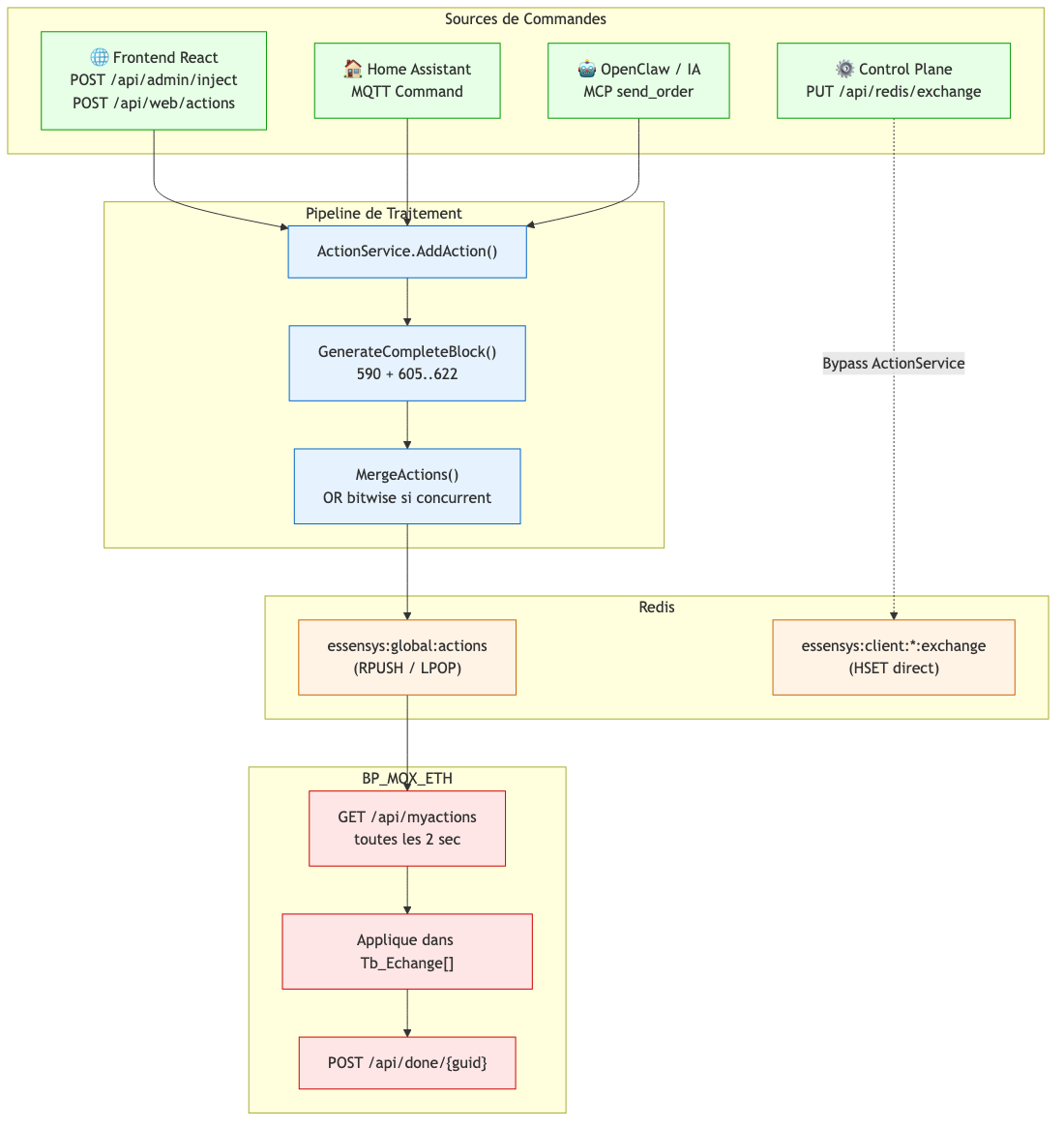
graph TB
    subgraph Sources["Sources de Commandes"]
        web["🌐 Frontend React<br/>POST /api/admin/inject<br/>POST /api/web/actions"]
        mqtt_src["🏠 Home Assistant<br/>MQTT Command"]
        mcp_src["🤖 OpenClaw / IA<br/>MCP send_order"]
        cp_src["⚙️ Control Plane<br/>PUT /api/redis/exchange"]
    end

    subgraph Pipeline["Pipeline de Traitement"]
        as["ActionService.AddAction()"]
        gcb["GenerateCompleteBlock()<br/>590 + 605..622"]
        ma["MergeActions()<br/>OR bitwise si concurrent"]
    end

    subgraph Redis["Redis"]
        queue["essensys:global:actions<br/>(RPUSH / LPOP)"]
        direct["essensys:client:*:exchange<br/>(HSET direct)"]
    end

    subgraph Firmware["BP_MQX_ETH"]
        poll["GET /api/myactions<br/>toutes les 2 sec"]
        exec["Applique dans Tb_Echange[]"]
        ack["POST /api/done/{guid}"]
    end

    web --> as
    mqtt_src --> as
    mcp_src --> as
    cp_src -.->|Bypass ActionService| direct

    as --> gcb
    gcb --> ma
    ma --> queue

    queue --> poll
    poll --> exec
    exec --> ack

    classDef source fill:#e6ffe6,stroke:#009900
    classDef pipe fill:#e6f3ff,stroke:#0066cc
    classDef store fill:#fff3e6,stroke:#cc6600
    classDef fw fill:#ffe6e6,stroke:#cc0000

    class web,mqtt_src,mcp_src,cp_src source
    class as,gcb,ma pipe
    class queue,direct store
    class poll,exec,ack fw
9. Sequence de Boot — Initialisation du Firmware
Sequence d'initialisation complete de la tache Main au demarrage du BP_MQX_ETH.
sequenceDiagram
    autonumber
    participant BL as Bootloader
    participant MQX as MQX RTOS
    participant MAIN as Main_task
    participant SPI as EEPROM SPI
    participant HW as Hardware GPIO/ADC/PWM
    participant ETH as Ethernet_task
    participant SRV as Serveur Essensys

    Note over BL: Power-on MCF52259
    BL->>BL: Verifie CRC zone application
    BL->>BL: APP_CALL() → saut vers __boot

    BL->>MQX: Demarre MQX RTOS
    MQX->>MQX: Init BSP, I/O subsystem
    MQX->>MAIN: Cree 5 taches (prio 8, time-slice)

    Note over MAIN: _time_delay(500ms)
    MAIN->>MAIN: vd_TableEchangeLireEnFlash()
    MAIN->>MAIN: vd_InitVariablesGlobales()
    MAIN->>HW: vd_InitHard() — GPIO, ADC, PWM, I/O

    MAIN->>SPI: vd_SpiOpen() — 500 kHz, Mode 0
    MAIN->>SPI: vd_ReadAdresseMac() — 0xFA, 6 octets
    SPI-->>MAIN: Adresse MAC
    MAIN->>SPI: vd_ReadCleServeur() — 0x00, 16 octets
    SPI-->>MAIN: Cle serveur
    MAIN->>SPI: vd_ReadCodeAlarme() — 2 octets
    SPI-->>MAIN: Code alarme

    Note over MAIN: _time_delay(1000ms)
    MAIN->>HW: Active BP_O_UC_BATT_CTRL
    MAIN->>HW: Active BP_O_15VSP_ALIM_BA
    Note over MAIN: _time_delay(100ms) stabilisation

    Note over MAIN: Boucle principale demarre
    Note over MAIN: Chauffage, alarme, scenarios...

    par Tache Ethernet (parallele)
        ETH->>ETH: DHCP + DNS resolution
        ETH->>ETH: cryptage() → c_MatriculeCryptee
        ETH->>SRV: GET /api/serverinfos
        SRV-->>ETH: 200 OK + indices a surveiller
        loop Toutes les 2 secondes
            ETH->>SRV: POST /api/mystatus
            SRV-->>ETH: 201 Created
            ETH->>SRV: GET /api/myactions
            SRV-->>ETH: 200 OK + actions
        end
    end
10. Securite — Chaine d'Authentification
Flux de generation de la cle d'authentification et chiffrement des ordres alarme.
graph LR
    subgraph EEPROM["EEPROM SPI (CS0)"]
        cle["Cle Serveur<br/>16 octets @ 0x00"]
        mac["Adresse MAC<br/>6 octets @ 0xFA"]
        code["Code Alarme<br/>2 octets"]
    end

    subgraph Auth["Authentification HTTP"]
        hex["Conversion Hex<br/>16 octets → 32 chars"]
        md5["Hash MD5<br/>(RFC 1321)"]
        fmt["Format<br/>16premiers:16derniers"]
        b64["Encodage Base64"]
        header["Authorization: Basic<br/>c_MatriculeCryptee[46]"]
    end

    subgraph AES["Chiffrement Alarme"]
        iv["IV = 8 premiers octets<br/>du digest MD5"]
        rijndael["Rijndael-CBC<br/>128 bits / 256 bits cle"]
        parse["UnParceAES()<br/>separateur ;"]
    end

    subgraph HTTP["Requetes HTTP"]
        get["GET /api/serverinfos"]
        post["POST /api/mystatus"]
        actions["GET /api/myactions"]
        done["POST /api/done/{guid}"]
    end

    cle --> hex
    hex --> md5
    md5 --> fmt
    fmt --> b64
    b64 --> header

    md5 -.->|8 premiers octets| iv
    iv --> rijndael
    parse --> rijndael
    rijndael --> code

    header --> get
    header --> post
    header --> actions
    header --> done

    classDef eeprom fill:#fff3e6,stroke:#cc6600
    classDef auth fill:#e6f3ff,stroke:#0066cc
    classDef crypto fill:#ffe6e6,stroke:#cc0000
    classDef http fill:#e6ffe6,stroke:#009900

    class cle,mac,code eeprom
    class hex,md5,fmt,b64,header auth
    class iv,rijndael,parse crypto
    class get,post,actions,done http
11. Reseau — Topologie LAN / WAN
Architecture reseau montrant les deux chemins d'acces (local et distant) et le role du DNS.
graph TB
    subgraph WAN["Internet / WAN"]
        user_ext["👤 Utilisateur Distant"]
        dns_pub["DNS Public<br/>mon.essensys.fr → IP WAN"]
        letsencrypt["Let's Encrypt<br/>Certificats TLS"]
    end

    subgraph Box["Box Internet (SFR/Orange/Free)"]
        nat["NAT / Port Forwarding<br/>:443 → RPi :443"]
        dhcp_box["DHCP Range<br/>192.168.x.100-254"]
    end

    subgraph LAN["Reseau Local 192.168.x.0/24"]
        subgraph RPi["Raspberry Pi — 192.168.x.10"]
            adguard_dns["AdGuard Home<br/>DNS :53<br/>Rewrite mon.essensys.fr → 192.168.x.10"]
            traefik_lan["Traefik<br/>HTTPS :443"]
            nginx_lan["Nginx<br/>HTTP :80"]
            backend_lan["Backend Go<br/>:80"]
        end

        subgraph Firmware["BP_MQX_ETH — 192.168.x.151"]
            fw_dhcp["DHCP Client"]
            fw_dns["DNS → AdGuard<br/>mon.essensys.fr → 192.168.x.10"]
            fw_http["HTTP Client<br/>Port 80 uniquement"]
        end

        subgraph Clients["Appareils Locaux"]
            user_local["👤 Utilisateur Local<br/>(PC / Mobile / Tablette)"]
            hass_local["🏠 Home Assistant"]
        end
    end

    user_ext -->|HTTPS :443| dns_pub
    dns_pub -->|IP WAN| nat
    nat -->|:443| traefik_lan
    letsencrypt -.->|ACME Challenge| traefik_lan
    traefik_lan --> nginx_lan

    user_local -->|DNS Query| adguard_dns
    adguard_dns -->|192.168.x.10| user_local
    user_local -->|HTTP/HTTPS<br/>mon.essensys.fr| nginx_lan

    fw_dhcp -->|DHCP Request| dhcp_box
    dhcp_box -->|IP 192.168.x.151| fw_dhcp
    fw_dns -->|DNS Query| adguard_dns
    adguard_dns -->|192.168.x.10| fw_dns
    fw_http -->|GET/POST :80<br/>Polling 2s| backend_lan

    hass_local <-->|MQTT :1883| RPi

    classDef wan fill:#ffe6e6,stroke:#cc0000,color:#000
    classDef box fill:#fff3e6,stroke:#cc6600,color:#000
    classDef rpi fill:#e6f3ff,stroke:#0066cc,color:#000
    classDef fw fill:#ffe6cc,stroke:#996600,color:#000
    classDef client fill:#e6ffe6,stroke:#009900,color:#000

    class user_ext,dns_pub,letsencrypt wan
    class nat,dhcp_box box
    class adguard_dns,traefik_lan,nginx_lan,backend_lan rpi
    class fw_dhcp,fw_dns,fw_http fw
    class user_local,hass_local client
Flux reseau cles
| Chemin | Protocole | Port | Description |
|---|---|---|---|
| Utilisateur distant → RPi | HTTPS | 443 | Via NAT box, certificat Let's Encrypt |
| Utilisateur local → RPi | HTTP/HTTPS | 80/443 | DNS AdGuard rewrite vers IP locale |
| BP_MQX_ETH → RPi | HTTP | 80 | Polling toutes les 2s, JSON, port non modifiable |
| Home Assistant → RPi | MQTT | 1883 | Discovery + commandes/etats |
| RPi → Cameras | HTTPS | 443 | Snapshots UniFi Protect |
| RPi → OpenAI | HTTPS | 443 | Reformulation alertes (via OpenClaw) |